Download document () of 20
 Send email
Download
You have exceeded the download limit
Version: 5.6 | June 2016 | J. Childs, J. Benoit and D.Sutton, Eaton
Document audience
The document is written for IT and security personnel to understand the computing and security architecture of the Eaton Cooper PowerE series Yukon Advanced Energy Services software platform for the deployment of demand response (DR) solutions.
Document purpose
This document provides information on the deployment characteristics for a demand response system. It provides information on the architecture, system integration, and external interfaces. The purpose of each section in the document is provided below.
Yukon demand response solution
Yukon demand management is a suite of applications that interoperate together to provide a utility company’s customers with the ability to manage demand, and in the process, provide emergency, energy, and capacity management to the utility. There are retail users (switches and smart thermostats in residential housing), small commercial users (switches and smart thermostats), and large commercial and industrial users (gateways, direct EMS/BCS links, and direct control devices).
The Yukon software provides the tools to effectively manage a demand response program. More specifically, it provides both automated DR and messaging options. In automated DR situations, Yukon initiates a signal to adjust the load profile of air conditioners, pool pumps, water heaters, motors, and other industrial loads. It can also signal building control systems or perform load management function or turn on customer-owned generation. Messaging refers to the software initiating messages to provide the customer with information and notification messages detailing curtailment and real-time pricing information. Both automated DR and messaging can be initiated by an operator or automatically using a dynamic trigger. Yukon design emphasis has been placed on integration to other systems because of the diverse needs of today’s utility operation center. The master station is built to work as a standalone system or in concert with SCADA, EMS, CIS, Work Order Management, Inventory Control and Outage Management. Supported interfaces are documented in Eaton EMS/SCADA interface technical note.
Yukon provides a Web-based front-end client for administrative, help desk, and end user services; a Web service channel that takes requests from the Web front end; and back office services that communicate with remote field equipment and utilities’ systems as shown in Figure 1.
 Figure 1. Yukon systems
There are three key areas of the Yukon suite that should be discussed for DR purposes:
Web-based front end
The primary means of interacting with Yukon is through a Web browser. Yukon Web displays offer a rich and flexible solution appropriate for the many types of users that may interact with a DR deployment. Access is managed through a role-based security profile. During system commissioning, user roles are identified and mapped to role properties that define the access controls for the user classes. For example, the utility can establish separate roles and provide different functionality to DR program administrators, call center representatives, control room operators, IT system administrators, commercial load supervisors, or end-consumers.
Yukon background services
The backbone of Yukon is a set of services that contain the business logic for various processes to carry out specialized tasks and maintain interoperability of Yukon components. These crucial pieces of the Yukon master station run on a WindowsT server as standard services, making Yukon deployment into an existing IT framework simple and straightforward. The servers can run together on a machine with clients in a simple “stand-alone mode” or can be distributed on dedicated servers or clusters.
The following Yukon services are typical of a DR deployment:
Yukon system administration (Java) clients
The following are the administrative Yukon client modules; each Java application is used by administrative personnel to set up and manage the system within the corporate data network. These can be used in tandem with Yukon’s primary Web portals to support and maintain the system or can be isolated to specific workstations. In all cases, access to the system administration tools is controlled by the user class role properties.
Demand response hardware
Direct load control switches
Eaton offers a variety of application-oriented switches, with wide configurability, choice of relay configuration, and a choice of communications.
Eaton switches have several unique strengths:
 Figure 2. Yukon services
Smart thermostats
Eaton provides an interface to smart thermostats that are manufactured by third parties. Yukon is integrated to the thermostat manufacturer cloud services through APIs provided by the smart thermostat manufacturer. The smart thermostat vendor performs communication from their cloud services to the end device.
Industrial and utility gateways
Eaton offers a complete line of direct control gateway devices with flexible configurations to meet the requirements of controlling large commercial and industrial clients. The gateways support a wide range of utility and industrial protocols. All gateways include the ability to communicate to Yukon in one protocol and communicate to the end device in a separate protocol (e.g., EMS/BCS, IEDs, etc.). The gateways also include the ability to add I/O boards to collect analog and digital data and support latching and pulse relays.
IT deployment
A standard installation of Yukon consists of multiple Windows services including 1–2 Apache Tomcat Java Servlet containers, 4–5 C++ services, and potentially several Java services. The Yukon architecture is designed to be deployed in an existing IT environment. This allows Yukon to take advantage of existing disaster recovery, high availability, backup policies, and security policies used with similar enterprise platforms at the utility or hosting site.
Security
For details about security in Yukon, please see the system security plan section.
An important note for deployments that may not have a security or IT policy for Tomcat: Apache can be used as a front door to different Tomcats for different URL namespaces (/app1/, /app2/, /app3/, or virtual hosts). The Tomcats can then be each in a protected area and from a security point of view; you only need to worry about the Apache server. Essentially, Apache becomes a smart proxy server.
Database
The Java applications use a JDBC driver for database connectivity. The server side applications use a third-party database access library. Yukon supports the following database software:
Note: Eaton publishes a Platform Validation Matrix documenting version support of OS, database, and browser covering current and future release plans.
Communication between the Yukon services and the database can be configured with encryption so that all requests and responses are not visible on the sub-network between the application server and the database server. The encryption can be disabled to support system troubleshooting.
As indicated by the above list, the Yukon database requires an Oracle or MicrosoftT SQL server environment. In many instances, the system is integrated into the utility’s existing RDBMS environment. The server platform for Oracle can be UNIX or Microsoft Windows based. Disk storage requirements are driven mostly by the count, duration, and frequency of interval data stored in the system. A typical configuration includes:
Notes: D: and E: Drives should be solid-state drives for higher performance. Detailed minimum database server hardware requirements are published at least annually based on internal testing with currently supported RBMS versions. The database server requirements are sensitive to application functionality, interval data, and the number of simultaneous users. Web server and application interfaces
Yukon supports the following Internet browsers:
Note: Eaton publishes a Platform Validation Matrix documenting version support of OS, database, and browser covering current and future release plans.
Yukon’s Web-based front end is specifically designed to avoid using browser plug-ins due to potential deployment problems in some utility environments. However, some portions of Yukon require the use of cookies to function correctly. Session information such as the user’s main entry page and also the re-direct on logoff is saved in a cookie pushed to the user’s machine.
The browser clients have been designed for the daily use of the system. Functionality for customer service, system operators, and end user access if provided by the utility are all available through the browser-based clients. The browser client applications are all JSP/Servlet-based, much of it based on the Spring model. Set up and administration of the system is mainly performed through a suite of Java-based applications. These applications are available from the browser through the use of Java WebStart. Additionally, they are part of the standard platform installation and may be placed locally on multiple machines. Typical installations deploy these programs locally on the application server and again on the system administrator’s machine.
Apache Tomcat is the primary Web server used by the Yukon Web application service. There are several ways that this Web server can be used. It can be installed in the utility’s DMZ directly and given a TCP/IP connection to the Yukon application server. A second installation option is to leave the Web server on the Yukon application server and deploy a Web server in the DMZ (such as IIS) to pass through the data requests to the Yukon application server. Additionally, the Enterprise Integration Module (EIM) portion of Yukon is designed to be deployed within Tomcat. The installation options of this auxiliary Web server are exactly the same as those described above for Yukon’s primary Web server. The Yukon EIM offers a set of SOAP-based Web Service calls that provide information and data interaction when an outside client application makes a request to them.
Web server hardware requirements are dependent on the expected number of users. For most installations, the Web servers are installed on the application server. If the specific solution includes access to the system by 50 or more simultaneous users, a separate hardware server for Web functionality should be provided. This hardware server can be configured in a similar fashion to the application server described in the next sub-section.
Application server
The Yukon platform requires an application server. As mentioned above, the application server typically houses the Web server, as well. It will also house the communication and business logic applications. The Yukon application server runs on the Microsoft Windows platform and operates on server hardware supplied by the major equipment providers. Equipment can be acquired by the utility. The minimum system requirements include:
Dual network adapters are recommended with the backbone between the application server and the DB server being a minimum of 1 Gb with 10 Gb recommended.
Note: Detailed minimum application server hardware requirements are published at least annually based on internal testing with currently supported OS, Tomcat, and Yukon services. The application server requirements are sensitive to application functionality and the number of simultaneous users.
Network
Communication between the application portions of Yukon is performed using TCP/IP connections. As stated above, the connection between the Yukon services and the database supports data encryption.
The network bandwidth requirements are minor traffic in a typical deployment. In Eaton’s central hosted environment, a T1 supplies all connectivity for 15–20 separate Yukon systems. The bandwidth is monitored and has never approached a level that would cause alarm. Yukon does not produce additional network traffic during the execution of specific processes in measurable amounts. The number of simultaneous users affects the network traffic more than a specific process.
High availability
Numerous Yukon installations have been performed on fault tolerant hardware platforms that include RAID disk storage, redundant power supplies and other components to reduce increase system reliability. The Yukon platform has also been deployed in both Microsoft and Veritas clustering environments. While the Yukon applications do not report their health directly to the cluster, the clustering software is given control over starting and stopping the applications. This allows the cluster to control which node is active on the system.
Yukon has also been deployed on the NEC fault tolerant server platform.
Yukon platform validation matrix
A minimum system requirements chart is provided with each release of the software. This chart details operating systems, databases, and browsers used for the validation of that particular release. A longer term testing matrix is updated annually to contain the expected support for these system items in upcoming releases. Eaton makes these documents available through our customer service website to allow for better planning of upgrades and maintenance schedules.
Hosting services
Eaton hosting services are designed for customers that are running mission-critical, real-time applications. Examples of these applications include: Price Response Systems, Demand Response Systems, Distribution Automation, Distributed Generation Management, and any application where dispatch or communications with field devices is required. The following describes the basic hosting environment. Additional functionality can be provided, but requires statement of work and change order.
System hardware. The solution is an enterprise-class cloud computing Infrastructure-as-a-Service (IaaS) platform designed to support heavy compute, high memory, and high storage IO application workloads. The platform utilizes only best-in-class hardware and software from Cisco, EMC, and VMware. It was specifically designed for high availability with enterprise-class functionality and security.
System and database software. Licensor provides all software required to operate the system. This includes the operating system, Web services, and database server. The Yukon software operates on the current Microsoft Windows Server operating system. The business logic, accessing data, authenticating logins, etc. is done through several servlets. We use jsp for the presentation layer to generate dynamic html. The database engine is built upon the Microsoft SQL server technology.
System security. Eaton provides a security framework for the system for the utility’s personnel, consumers, and system administration access to the system. Every system is installed with a Third Party Secure Certificate Authority SSL Certificate. All Licensee’s Personnel access to the system is done through HTTPS via a Web portal. All Web portal access to the system is managed by role-based security and all changes to the system are logged with the Login ID. Licensee is given individual logon access that restricts them to access only their enrolled applications. Licensee has write capabilities to adjust only specific information about their access or enrollment. Licensee’s personnel are given individual logon access that provides them with Web access to only applications and capabilities that meet their job function. Licensor’s System Administrators access the system through an IPsec VPN. Licensee’s personnel do not have access to the hosted virtual server, the only access provided is to the Yukon software.
A typical Eaton managed (hosted ASP) system set up is shown in Figure 3.
System security plan
The Yukon software platform is designed to support many of the key technologies that drive the development of the Smart Grid:
Because it bridges the gap between the consumer and the utility, the Yukon software meets the availability and integrity requirements of control systems, while ensuring the confidentiality of consumer data as is expected of a business system.
To meet these requirements, Eaton has addressed the technology, policies, and procedures that provide the operational resilience required from a Smart Grid system. The security program addresses the following:
Personnel
Eaton recognizes that its employees constitute a critical element of any security plan. Because many of its customers operate systems that fall under the requirements of the NERC CIP, Eaton has established an internal program called “Helping Utilities Meet NERC CIP”. Key components of this program are policies that help utilities meet the CIP-003 information security and CIP-004 personnel requirements.
All Eaton employees are subject to a security assessment at the time of hiring and must comply with the Eaton substance abuse policy. Through its “EAS Security Qualified Engineering Team Policy”, Eaton further ensures that all employees who perform engineering and integration work for its customers meet the CIP-004 requirements including seven-year criminal background checks, cybersecurity training, and awareness. Through its “EAS Information Security Policy”, Eaton also ensures that all employees who are exposed to confidential customer information apply the appropriate security controls.
 Figure 3. Typical Eaton managed (hosted ASP) system
Software development lifecycle
Security cannot be added on; it must be built in. Eaton product development teams already apply industry best practices, including security, to the development process. The Eaton quality assurance process includes security testing and secure design training for engineering staff, source code and configuration management, along with an independent security validation of Eaton enterprise applications.
Eaton has already implemented a security update validation process for its substation products. Additionally, we are integrating security and robustness testing of our network-enabled products using the Wurldtech Achilles device with the goal of achieving the Achilles certification for all applicable devices.
Eaton has implemented a constant improvement process for its Security Development Lifecycle to continue to meet its customers’ security requirements with a comprehensive patch and update process, system hardening guidelines, and network architecture guidelines expanding on the policies identified in this plan.
Yukon third-party security audit
Eaton has worked with Aspect Security (www.aspectsecurity.com), both as part of a specific customer’s DR deployment and within Eaton’s own development cycle process, to ensure Yukon is a more secure Web-based application. Using a combination of on-site sessions and investigation in the field, Aspect:
One of the primary goals of working with Aspect was making sure that no unauthorized user could start or stop control of devices from any Yukon access point. After a thorough investigation, Aspect’s team was unable to invoke unauthorized Event Activation capabilities within Yukon. The Aspect investigators verified that all of Yukon’s security controls were in place to prevent unauthorized users from any load management control interfaces through the Web application. Additionally, they made sure that no matter the access point, Yukon still required the user a) authenticate and b) be in the appropriate role before allowing access.
The Yukon software is continually updated and enhanced to support our utility customers. There are two major releases of Yukon per year and maintenance releases as necessary. Maintenance releases contain minor improvements and defect fixes. Each major release of the software is independently checked for intrusion detection and secure computing practices by the Eaton COE security group. Eaton recommends the software be updated annually to stay current with the newest features available as well as the continuous security improvements.
Application and data server network architecture
Computing environment security is critical to utility operations. Implementing a secure computing environment requires a utilitywide focus that starts with the Utility IT infrastructure, includes network access, server access, user access, communication methods, protocols, and field equipment. Any utility that deploys solutions for internal infrastructure and with external customers must be concerned about the secure operation of the system and the protection of the system from malicious attacks. Eaton has engineered Yukon to meet these requirements by making it multitiered, compliant with industry security standards, and by using secure and encrypted communication protocols.
 Figure 4. Application and data server network architecture
The Eaton enterprise applications protect data via authentication, authorization, and encryption. Multi-level permissions are used to authorize user actions and restrict data access. Sensitive customer data is maintained and updated via secure integration standards. User and data actions are logged for historical auditing. Data is protected during use of any Eaton application. These security features are consistent across all Eaton applications and are covered in this plan.
Yukon is built upon a three-tier computing architecture as recommended by NIST SP800-82. This architecture separates the database, application, and presentation services to independent servers and trusted security levels within the utility.
When Yukon is integrated into the utility infrastructure and becomes part of the utility-wide computing environment, it can be deployed as shown in Figure 4. This architecture takes full advantage of the three-tier security infrastructure by physically and logically separating the computing functions. The data layer applications are completely isolated from application processing. Database administration and system backups are accomplished as an integrated function. Only trusted and secure clients and application servers have access to the data LAN. At the Application Server level, servers are configured with two (or more) Ethernet ports. One port is dedicated to communicate over the data layer for access to the corporate computing and database resources and the other port(s) connect to trusted physically isolated clients. The final component, the presentation layer, connects users with applications. This configuration when combined with routers and firewall devices (not shown) provides a secure computing environment where levels of system access and capability can be provided to utility users that require access to applications and databases.
External Web access security
In order to provide secure communications to all Web-based users, and more specifically to the utility’s customers, Yukon fully supports the use of Transport Layer Security (TLS, successor to Secure Sockets Layer, or SSL). This standard protocol, supported by all Web browsers, ensure the authenticity of the server and provides encryption for all data exchanges.
In order to implement secure communications, the utility will need to purchase a Web certificate from a Certification Authority such as VeriSign. Eaton can assist utilities in setting up their secure Web servers.
Yukon can be configured to work with additional security devices including direct VPN and SSL VPN products. The VPN products provide an additional level of security by allowing only authorized computers with access to the network. Hardware and software VPN solutions are available from multiple suppliers, and Eaton has performed integration to several packages.
Hosting security
Eaton can also deploy Yukon at a customer preferred hosting provider. Eaton requires hosting providers to provide a formal security plan that addresses the following requirements as stated by the American Recovery and Reinvestment Act of 2009 (ARRA):
Our standard security policies meet the requirements of most utility programs. If additional security policies and or services are required, we work with our hosted service provider and the utility partner to define and agree to revisions, implementation and document within the contract.
User permissions and application access
Yukon controls user access through a series of robust permissions. Before any user request is acted upon, strict validation is applied to verify the user’s authority and access rights within the application. These roles and permissions are organized by login group membership and per individual user. Each user has their own password.
The Yukon platform can currently perform password authentication, based on user lookup, against an existing Active Directory, LDAP or Radius server. This allows an IT department or hosting provider the ability to apply their preexisting password rules to their Yukon deployment. Yukon is also capable of directly controlling login security through use of login names and passwords kept in its own database. Password rules are supported that meet the current NIST recommendations and are encrypted.
Yukon’s diverse user permissions allow numerous types of business and technical users to be represented. However, the majority of deployments involve the following three basic user roles:
Table 1 shows an access control matrix and key functions and user level mapping examples typical at many customer sites. As mentioned before, the number of possible login group and role property combinations means many combinations of user levels and system permissions are possible, but this matrix and matching descriptions represent standard Yukon DR use.
| Key functions/user levels | IT administrator |
Load control operator |
CSR manager/ business manager |
CSR | Advanced consumer (commercial) |
Typical residential consumer |
| Perform/monitor load control | ||||||
| View application logs | ||||||
| Access Yukon “heavy” clients | ||||||
| Generate reports | ||||||
| Send configuration commands | ||||||
| Deactivate a switch or thermostat device | ||||||
| Add or remove a switch or thermostat device | ||||||
| Edit customer account data | ||||||
| Add or remove a customer account | ||||||
| Change account username and password |
|
|
||||
| Manually adjust thermostat |
|
|
||||
| Change program enrollment |
|
|
||||
| Send opt out to a switch or thermostat |
|
|
||||
| View control history |
|
|
Key function descriptions
Perform/monitor load control
The application allows the administrator the ability to start, stop, and monitor load management programs. When a DR program is activated, the application sends out commands to devices in the field, including both thermostats and switches. The devices in the field will respond to these commands by either adjusting temperature settings, ramping set point temperature, or performing advanced cycling.
View application logs
The application allows an administrator to view the Yukon services logs through the Web browser. These logs include satellite heavy client logs, the Web service logs, and other Yukon application logs. Access Yukon “heavy” clients
The application allows access to its “heavier” Java Swing administrative and control client applications through the Web. This access would normally only be granted to an IT or DR administrator. This functionality utilizes Java Web Start to download and run the Java Swing client application onto a local machine (although this functionality can be disabled).
Generate reports
The application allows an IT or DR administrator to generate various reports that return data from different components of the application. Depending on the report, contents may consist of raw values directly from the database, calculated values, or both.
Send configuration commands
Individual switches and thermostats have internal levels of addressing that affect communication. The application allows an administrator or high-level operator to change this addressing and reconfigure a device or devices with the updated addressing information.
Deactivate a switch or thermostat
The application allows devices, either switches or thermostats, at customer accounts to be removed from service. This can be done by a system interface with a separate application (e.g., direct interface, file import, or EIM call) or per account through the user interface.
Add or remove a switch or thermostat
The application allows devices, either switches or thermostats, to be assigned to customer accounts. Only an operator or administrator can add or remove devices. This can be done by a system interface with a separate application (e.g., direct interface, file import, or EIM call) or per account through the user interface.
Edit customer account data
The application tracks basic customer account information, such as street address. Only an operator or an administrator can both view and edit this information for any account.
Add or remove a customer account
The application allows an administrator or high-level operator to add or remove individual customer accounts. This can be done by a manual file import or per account through the user interface and is normally in tandem with the ability to Edit Customer Account Data.
Change account username and password
Every customer account in the application can be assigned a username and password that grants a consumer end-user access to that account.
Manually adjust thermostat
The application allows a consumer (end-user) or operator to manually adjust a thermostat in the consumer’s home. The temperature can be raised or lowered and fan speeds adjusted through the application; these changes are then sent out to the thermostat. This also includes changing the thermostat schedule.
Change program enrollment
A consumer’s thermostats and switches can be enrolled in load programs. These program enrollments determine how load control will affect those devices. The application allows an operator/ administrator, or in some cases, a consumer end-user, to change the program(s) in which a switch or thermostat is enrolled.
Send opt out to a switch or thermostat
An opt out, or override, sends a temporary out-of-service command to a device, telling it to not respond to load control for a given number of days. An override example might be the request by a customer who has visitors with a medical condition or scheduled social gathering. The application allows the DR administrator to define the opt out rules.
View control history
The application allows load control history to be viewed per account. Load control history gives the duration of control for varying periods of time, organized by load program. This ability can be given to any user in the energy company but is read-only; the control history data cannot be changed.
Application logging
An effective application security policy should include a strong audit trail. Through its extensive logging capabilities, Yukon is able to record a great deal of information to various database tables and to its full application logs on the server file system. This logged information can be used for auditing purposes by program administrators and managers, as well as for technical troubleshooting.
In general, Yukon records the following attributes (where applicable to the logged transaction or application action):
Information logged to the database can be maintained for the life of the application. Information that is also replicated in log files can be found on the server until the end of the standard 30-day rotation of all Yukon log files.
Such logged information is extremely sensitive. Yukon will only allow viewing of logging information through its Web interfaces to users with the appropriate rights. Users with direct logon access to the Yukon Application server (generally only the IT administrator) can access the text log files on the system for archiving and management.
Communications with field devices
The Yukon platform supports a wide range of communication protocols, medium, and methods to support the needs of our utility clients. For DR solutions, the following communication technologies are currently being deployed:
Figure 5 provides an overview of the communications options for residential and small commercial DR systems.
Yukon (either upon a trigger or an action by a user) creates a message to one or more field devices. Prior to transmitting the message, it is encrypted using one of the methods supported by Eaton. The field device upon receipt of the message, de-crypts the message and processes it. In all cases, the communication system between the Yukon master station and the field device comprises multiple components as follows:
The sections that follow provide details on the communication system and security for each of the DR network communication types shown in Figure 5.
 Figure 5. DR device communication overview
Broadcast DR
The majority of all mass market (residential and small commercial) DR systems use a one-way broadcast communications system to transmit DR signals from the master station to the end device.
Eaton supports three broadcast communication systems:
Eaton has implemented a secure protocol for the one-way communication environment. The Eaton one-way message encryption algorithms use industry standard security methods that are applied in a unique way to address the inherent limitations of a one-way and lossy communication system. The system is deployed with a utilityunique private key and two daughter keys. The private key is used to encrypt all messages. The daughter keys are used to authenticate and decrypt the messages. The daughter keys are loaded into the hardware during manufacturing. The security features include:
There is a common DR architecture for all of the broadcast communication solutions provided by Eaton as shown in Figure 6. A DR message can be created at a user request (utility or end-consumer) or by a trigger mechanism (e.g., execute load event upon price signal). The processing of a DR message is described below.
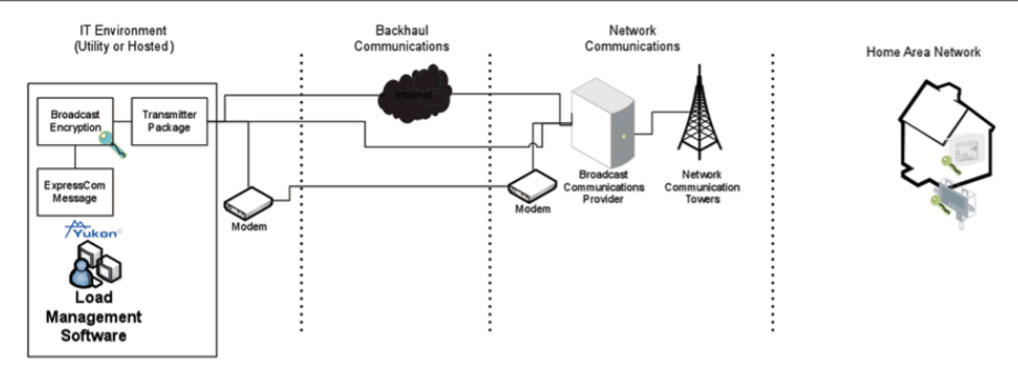 Figure 6. Broadcast DR overview
Eaton RF mesh DR
Eaton offers a two-way RF mesh communication system for DR applications. The DR end devices can be native RF mesh, ZigBee SEP HAN a, or a combination of both. The Eaton RF mesh communication system uses a superior performing mesh technology as a basis for the intelligent DR network capable of fast control event broadcasting as well as provides post-event confirmation of individual device event participation. The network is also capable of supporting real-time event reporting. Mesh communications provide high network communications reliability by supporting multiple diverse paths through which bi-directional communications can occur. In the case of DR event activation broadcasting, the Eaton RF mesh employs unique transmission diversity schemes that increase both the reliability as well as the speed with which event activation is signaled across the network. The RF mesh network delivers this highly reliable two-way communications across the unlicensed 900 MHz (902–928 MHz) band where the high available spectrum allows support for high data rate communications. The system employs frequency hopping spread spectrum communications across the available 25 MHz of bandwidth.
a. The ZigBee HAN solution requires an AMI meter with the ZigBee HAN gateway.
The Eaton RF mesh network is 100% self-organizing, self-forming, self-healing, and self-optimizing. No configuration of the nodes at the utility or in the field is required. The nodes automatically identify neighbors, form communication relationships, and they independently determine the most efficient path to the gateway. If these primary communication relationships are interrupted, the nodes automatically migrate to alternative routes to the gateway without any single point of failure. DR end devices are able to take advantage of the two-way network connectivity to support autonomous registration as well as provide updated status upon request.
Eaton system security has been designed, developed, and implemented on the basis of maintaining Confidentiality, Integrity and Availability (CIA) of data from devices to the head-end system across the different system exchanges, where:
The ExpressCom message is passed to the RF Mesh Network Manager. This process can be located on the same physical machine as the Load Management Software or on a separate machine in a separate environment. All communications between the Load Management Software and the Network Manager occur over an IP-based Transport Layer Security (TLS)/Secure Socket Layer (SSL) channel. The confidentiality and integrity of the data exchanges that is supported by the TLS/SSL tunnels between the Load Management Software and the Network Manager can be further augmented by software WAN VPN to enhance security.
 Figure 7. RF mesh with native DR node communication
DR with DigiT IP to ZigBee SEP gateway
Eaton has partnered with Digi International, Inc. to provide an end-toend broadband ZigBee SEP solution. The solution uses the Internet and the end-consumers broadband communications as the backhaul and network communication system. At the end-consumer location, the Digi gateway connects to the end-consumer’s broadband communication and provides the wireless ZigBee SEP HAN Trust Center that allows the connection of any ZigBee SEP 1.0 or 1.1 device. Additional details on the ZigBee SEP are provided in the “DR with ZigBee Smart Energy Profile (SEP)” section on page 15. Figure 8 shows the end-to-end system configuration for DR solution using the Digi Gateway and iDigi software.
 Figure 8. iDigi ZigBee SEP DR communication
A DR message can be created at a user request (utility or end-consumer) or by a trigger mechanism (e.g., execute load event upon price signal). The processing of a DR message is described below.
The Eaton and Digi international solution has been field tested with all Eaton DR SEP hardware at multiple locations. The solution also includes a SEP range extender for applications where the consumer loads are not within range of the gateway. The XBeeT PRO ZB is a Smart Energy Profile (SEP) certified wall plug RF range extender that increases distance and signal strength within the ZigBee mesh Home Area Network (HAN).
Figure 9 shows the complete DR solution including an end consumer’s access to their home devices using a smart phone application. The solution allows the end consumer remote management of their energy user, programmability of their thermostat, and monitoring of their thermostat settings. The solution can be used to manage AC energy use, pool pumps, water heaters, and other residential and small commercial loads.
 Figure 9. Complete DR solution including an end consumer’s access to their home devices using a smart phone application
DR with ZigBee Smart Energy Profile (SEP)
Eaton is an active participant in the ZigBee SEP 1.x and SEP 2.0 working groups. Our devices are SEP 1.0 and 1.1 certified. Eaton is developing SEP 2.0 devices in conjunction with the completion of the technical and testing requirements process. This section summarizes the secure computing environment of the SEP.
Additional details on ZigBee radios and SEP are published in open forums. The SEP 1.0 and 1.1 are part of the NIST accepted standards. The SEP specification covers the original encoding/decoding of messages in the IT environment and the decoding/encoding of the messages at the field equipment locations. The backhaul and network communication environment to transport the messages from the IT environment to the field equipment locations are provided by a communication manager (see Figure 10).
A DR message can be created at a user request (utility or endconsumer) or by a trigger mechanism (e.g., execute load event upon price signal). The processing of a DR message is described below.
 Figure 10. ZigBee SEP DR communication
| Version | Date | Change summary | Person |
| 3 | August 2007 | Initial release. Originally entitled Technical Bulletin Utility IT integration. | J. Childs |
| 3.6 | July 2009 | Updated document to address changes in server requirements, and supported browser and database. | D. Sutton |
| 3.7 | September 2009 | Review of materials update for OS functions. | D. Sutton |
| 3.9 | October 2009 | Removed external system interface details and created separate technical bulletin for server-to-server interface details. | J. Childs |
| 4.1 | April 2010 | Rewrote document to incorporate NIST recommended outline and content. | J. Benoit |
| 4.2 | May 2010 | Update of materials for submission with security plan for ARRA project grant. | J. Childs |
| 4.6 | April 2011 | Update of materials to include password rules and encryption native to Yukon instead of a password services platform. | D. Sutton |
| 4.7 | February 2012 | Review and update of document to update supported browser and database. | D. Sutton |
| 4.9 | January 2013 | Update of materials to remove information that is not specific to the secure computing environment. Added audience and change history. |
J. Childs |
| 5.1 | February 2013 | Review and update of all language. Added new sections on ZigBee and RF communications. | J. Childs |
| 5.2 | February 2013 | Review of changes with technical review team for accuracy. | J. Childs |
| 5.3 | February 2013 | Updated the RF mesh section to put ZigBee in standalone section. | J. Childs |
| 5.4 | June 2013 | Updated ZigBee section. Updated the hosting services section. | J. Childs |
| 5.5 | November 2016 | Updated hosting services section. Updated system specifications. Updated Yukon security testing. | J. Childs |
| 5.6 | June 2016 | Revised document to include licensed and hosted deployment. Changed the organization name to Eaton. Formatted the document to the current template. |
J. Childs |

 MyEatonFAQs


